
Showing reviews on Google Shopping
Put your review stars on your Google Shopping listings and ads. Meisei keeps a review feed for your store at an address Google reads, so once you add it in Merchant Center your new reviews reach Google without you doing anything else.
Before you start:
- You need a Google Merchant Center account that lists your products on Google, for free or in Shopping ads.
- Google wants 50 reviews first, counted across your whole catalog. Your feed's card in Meisei shows how many it holds.
- Every published review goes to Google, low ratings included. Google requires it, and it is why the feed only carries what your storefront already shows.
Add your feed in Merchant Center
-
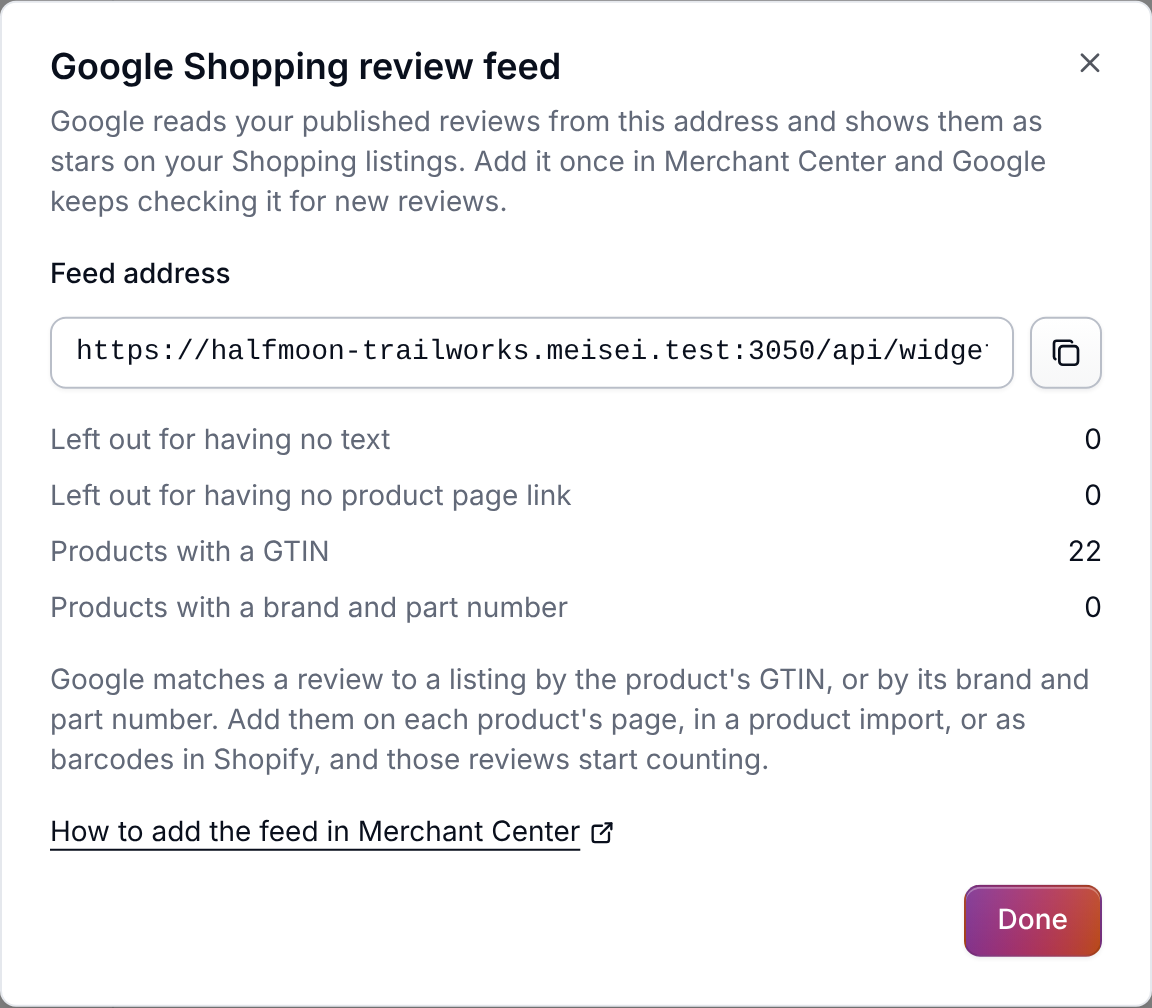
Open Settings → Integrations and click Google Shopping. Copy the feed address.
-
Ask Google to turn on product ratings for your Merchant Center account with its Product Ratings interest form. You only do this once.
-
In Merchant Center, open Reviews under Products & Store, then the Product reviews tab. Choose Manage product review sources, then Add product reviews.
-
Choose Add product reviews from a file, then Enter a link to your file. Paste the address, set it to fetch daily, and press Continue.
The new source can show as inactive for a while. Google takes two to four weeks to start showing stars.
Help Google match your products
Google puts a review on a listing by the product's GTIN, the number under its barcode (a UPC, EAN or ISBN). A product with no GTIN can match by its brand and part number instead. The card says how many of your reviewed products Google can match.
- On Shopify, fill in each variant's Barcode and the product's Vendor. Meisei picks them up the next time the product syncs.
- Otherwise, add them on the product's page under Products: Brand beside the product's details, and GTIN and Part number in each variant's details. A product import can fill them in for the whole catalog.
What stays out of the feed
- Reviews waiting for moderation, and reviews you've rejected or unpublished.
- Reviews with stars but no words. Google needs some text.
- Reviews of a product Meisei has no storefront link for. A connected Shopify store fills these in; otherwise include each product's page link in a product import.
If something isn't working
- Merchant Center says products are missing identifiers. Add GTINs, or a brand and part numbers, as above. Google can't place a review on a product it can't match.
- Stars still aren't showing after a month. Check the card says at least 50 reviews, and that the source in Merchant Center is set to fetch on a schedule.
Next steps
- Collecting reviews, to get past 50 sooner.
- Moderating reviews, since what you publish is what Google gets.
- Connecting Shopify